hello friends …..
I am going to share with you all a important trick to change your laptop’s or PC’s password within 30 seconds. Just follow the following steps and see the result just before you.
This trick can be applied to any windows PC or Laptop like Windows XP ,Windows Vista,Windows 7 andWindows8 also.
Prerequisites:
You must be logged-in in your PC for changing the password of your windows PC.or Laptop.Carefully follow the following steps to Change thepassword of your windows PC.
Steps :
1) Open Command Prompt as “Run With Administator”.
2) Go to the C:> drive by typing the command “cd\”
3) Type “net user” in the command prompt. This Command will display the all number of users of your PC.
4) Then choose the user for which you want to change your password.
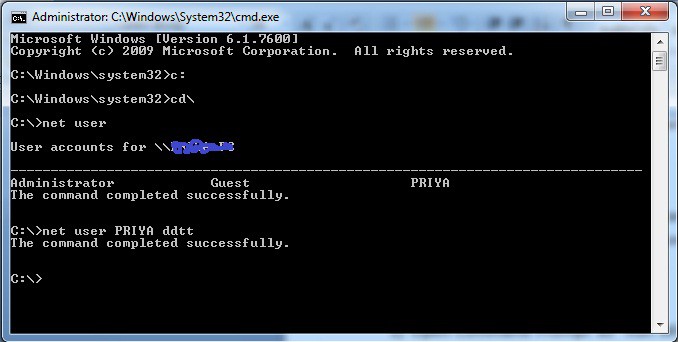
Ex :suppose you choose your account’s name “jeffry96”
Type the command “net user <username> <password>”
Ex : net user jeffry96 ddtt
Then your password will be changed to “ddtt”.
I am going to share with you all a important trick to change your laptop’s or PC’s password within 30 seconds. Just follow the following steps and see the result just before you.
This trick can be applied to any windows PC or Laptop like Windows XP ,Windows Vista,Windows 7 andWindows8 also.
Prerequisites:
You must be logged-in in your PC for changing the password of your windows PC.or Laptop.Carefully follow the following steps to Change thepassword of your windows PC.
Steps :
1) Open Command Prompt as “Run With Administator”.
2) Go to the C:> drive by typing the command “cd\”
3) Type “net user” in the command prompt. This Command will display the all number of users of your PC.
4) Then choose the user for which you want to change your password.
Ex :suppose you choose your account’s name “jeffry96”
Type the command “net user <username> <password>”
Ex : net user jeffry96 ddtt
Then your password will be changed to “ddtt”.


No comments:
Post a Comment
we love your comment